
Every few months, another “best AI tools for teachers” article goes live. They list the same 20 tools, describe what each one does, and leave you no closer to knowing which one to actually open on Monday morning.
This isn’t that guide.
We tested over 40 AI teaching tools across real lesson planning, grading, student engagement, and differentiation workflows.
What you’ll find below are the tools that consistently earned their place in a teacher’s day, with an honest look at where each one falls short.
Teacher adoption is accelerating. According to Education Week, 61% of teachers reported using AI tools in some capacity by 2025, nearly double the rate from 2023.
Before picking any tool, start here:
Where does your time actually disappear? Lesson planning? Grading? Keeping students engaged during class? Differentiating for different levels? The answer should guide every tool you try. A quiz generator won’t help you if your bottleneck is feedback.
TL;DR: Best AI Teaching Tools at a Glance (2026)
Different problems need different tools. Here’s the quick-reference version before the full breakdowns below.
| Tool | Best For | Standout Feature | Free Plan? |
|---|---|---|---|
| Edcafe AI | Full teaching cycle: create, assign, grade, track | Auto-grading with rubrics, student chatbots, real-time dashboards | Yes |
| MagicSchool AI | Reducing planning and admin time | 80+ tools including IEP generators, email writers, report card drafters | Yes |
| Brisk Teaching | Chrome-based classroom workflows | Generate full lesson sets from any webpage or YouTube video | Yes |
| Eduaide AI | Research-backed lesson planning | Evidence-based frameworks (5E, UDL, Backward Design) | Yes (limited) |
| NotebookLM | Deep prep from your own materials | AI that only uses sources you upload, with zero hallucination | Yes |
| Gradescope | Grading written work and exams at scale | Groups similar answers: grade an entire class in one pass | Yes |
| ClassPoint | Interactive PowerPoint lessons | Live polls, quizzes, gamification, all inside PowerPoint | Yes |
| Curipod | Real-time student engagement during class | AI feedback on student writing while class is still in session | Yes |
| Khanmigo | Student-facing tutoring | Socratic questioning: guides thinking, never just gives answers | Limited |
| Diffit | Differentiating reading materials | Rewrites any text at multiple reading levels in seconds | Yes |
As AI tools become more common in classrooms, teachers are discovering both the benefits and the tensions.
The same tools that promise time savings can create new work. The features that personalize learning can feel generic without customization.
Understanding these paradoxes of AI in education helps you use AI more strategically.
Full Teaching Workflow
1. Edcafe AI
Most AI tools help with one part of teaching. They generate the lesson, or produce the quiz, or grade the essay, leaving you to connect the dots across six different platforms.
Edcafe AI is built around a different idea: that creating materials, assigning them to students, collecting responses, grading them, and analyzing performance should happen in one place.
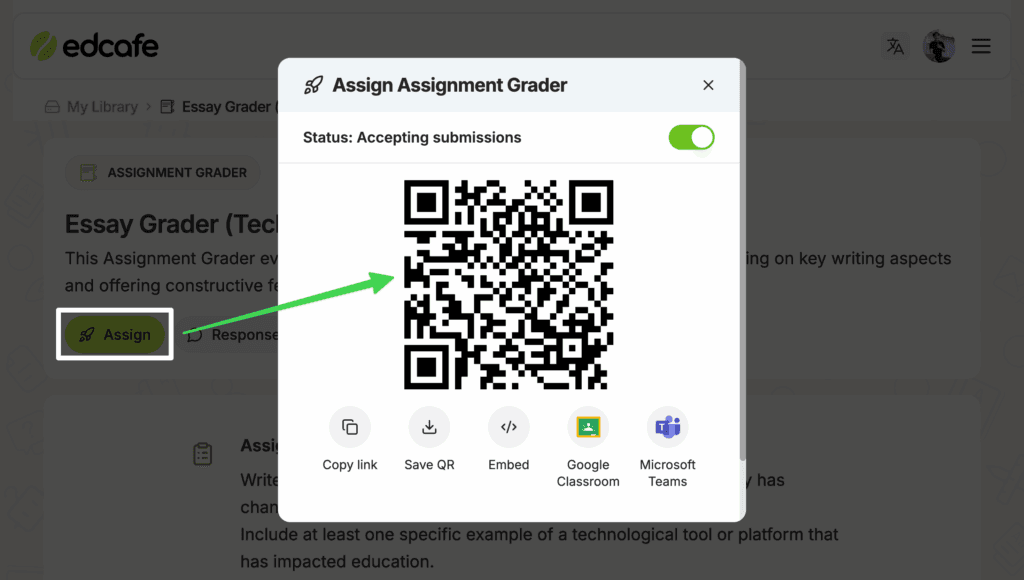
In practice, here’s what that looks like. You generate a reading activity from a YouTube video. Click Assign. Students scan a QR code and start working on their devices immediately, no account required. As they submit, you see completion rates and common errors update in your dashboard. Auto-grading scores responses against your rubric. Personalized written feedback goes to each student without you writing a single comment.
The tools that make this possible:
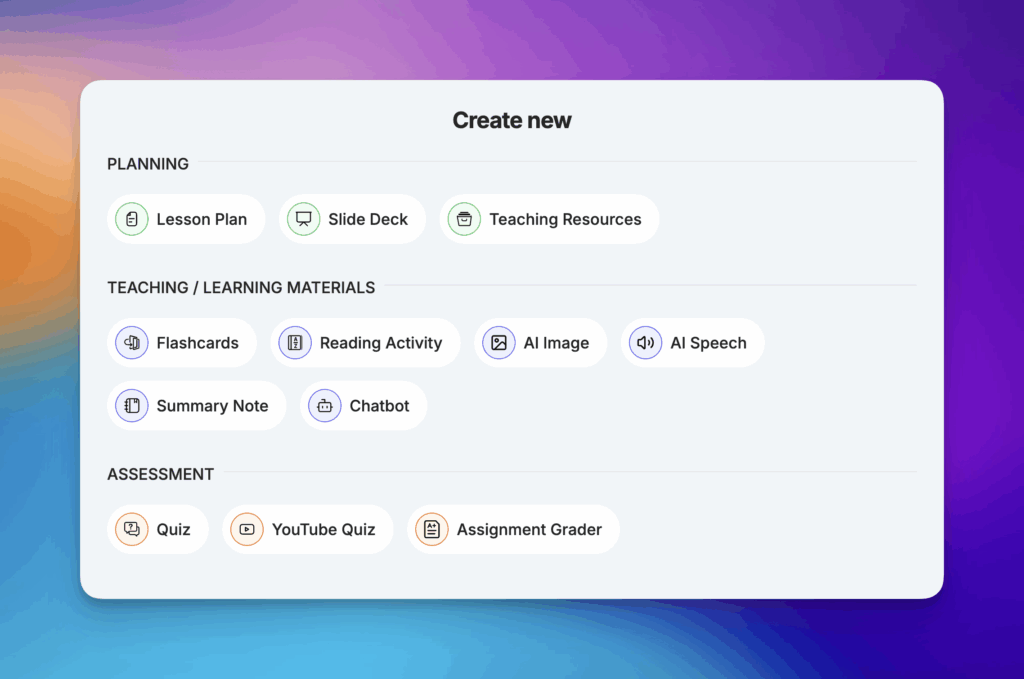
- Content generators: Lesson plans, slide decks, quizzes, flashcards, reading activities, vocabulary cards, summary notes, all from topic, text, file upload, webpage URL, or YouTube video.
- Assign: Share any generated material to students via QR code, link, Google Classroom, Microsoft Teams, Canvas, or Moodle.
- Auto-grading with rubrics: Upload your rubric. Edcafe AI scores submissions and drafts written feedback for each criterion. You review, edit, and send.
- Custom AI chatbot: Build a 24/7 classroom assistant from your own curriculum materials and instructions. Students get guided, grounded help. You see every conversation and receive alerts if a student appears confused or off-task.
- Real-time dashboards: Quiz analytics, assignment submissions, chatbot thread summaries, per student and per question.
- Library: Nested folder system (like Google Drive) to store, organize, and share everything you create.
A 2025 peer-reviewed study found that classes using Edcafe AI saw student engagement increase by 29 percent, with measurable improvements in test scores compared to classes that didn’t use the tool.
Pricing: Free plan includes 100 content generations per month. Pro plans start at $7.99/month.
Pros
- Only AI teaching tool covering the full cycle from content creation to student analytics in one place
- Students interact with materials directly on their devices, no extra logins or app downloads needed
- Auto-grading aligned to your own rubric with written feedback drafted per criterion
- Custom AI chatbots grounded in your classroom content, with full conversation visibility
- Multilingual content generation before and after creation, with multilingual voice actors
- SOC 2, GDPR, FERPA, and COPPA compliant, built for school use
Cons
- No dedicated worksheet or printable tools, better suited for digital delivery
- Free plan capped at 100 content generations per month. Teachers creating materials daily will hit this quickly
Best for: Teachers who want to move beyond content generation into real classroom interaction and data, without managing multiple platforms.
Lesson Planning & Content Creation
2. MagicSchool AI
MagicSchool AI is a teacher productivity platform built to reduce the admin and planning time that eats into actual teaching. It works through a chat-based interface backed by a library of 80+ specialized tools, from differentiated reading generators to IEP writers to parent email drafters to report card comment builders.
The best way to think about it: MagicSchool handles the paperwork side of teaching. Research from Education Week found that nearly 60% of school principals already use AI for tasks like drafting emails and policy documents, and MagicSchool targets the same time sinks for classroom teachers. Write a narrative report comment. Draft a parent update email. Create a behavior improvement plan. Adapt a passage for different reading levels. Generate an exit ticket aligned to today’s objective. All through natural language prompts, with outputs polished enough to use without heavy editing.
A Chrome extension brings these tools directly into Gmail, Google Docs, Google Classroom, Canvas, and Schoology. The platform’s AI coach “Raina” is available 24/7 for teaching support and questions.
Considering MagicSchool alongside Edcafe AI? Our side-by-side comparison covers the key differences in workflow, student interaction, and analytics.
Pricing: Free plan with access to most tools. MagicSchool Plus for schools is available at custom pricing.
Pros
- 80+ specialized tools spanning planning, admin, IEP/504, and student-facing work
- Chrome extension works across your existing platforms without switching tabs
- IEP and 504 plan generators with legally informed, structured language
- Web Search option pulls current information into generated content
- Student-facing “Rooms” let teachers share AI tools with classes in a controlled environment
Cons
- Slides generator creates text outlines only. You still build the visual presentation in another tool
- No built-in student interaction tracking or performance analytics
- Chat-based workflow can feel repetitive when making frequent small revisions
Best for: Teachers who want to cut admin and planning time, especially those supporting students with IEPs, diverse learning needs, or heavy documentation requirements.
3. Brisk Teaching
Brisk Teaching lives in your browser. As a Chrome extension, it appears as a side panel on any webpage, Google Doc, YouTube video, or PDF you’re already viewing, no platform switching required.
The concept is simple: generate teaching materials from whatever you’re already looking at. Open a news article. Highlight a section. Brisk produces comprehension questions at the reading level you specify. Watching a YouTube video? Brisk reads the transcript and builds a quiz. Working in a Google Doc? It gives batch feedback on an entire folder of student writing in one operation.
The Bulk Generate feature stands out for prep efficiency. From a single source, Brisk can simultaneously create lesson plans, guided notes, a quiz, discussion questions, and slide outlines, all organized automatically in your Google Drive.
Pricing: Basic plan is free with limited generations. Pro plan is $9.99/month.
Pros
- Works as a browser overlay, no platform switching, no new tabs
- Bulk generation creates complete lesson sets from a single source in one operation
- Batch feedback processes entire folders of student work simultaneously
- Multi-level differentiation generates three reading levels at once from the same source
- Full Google ecosystem integration: Docs, Slides, Classroom, Drive
Cons
- Chrome extension only, no standalone web app or Safari support
- Free tier usage limits are stricter than some competitors
- The depth of available tools means a steeper initial learning curve
Best for: Teachers embedded in the Google ecosystem who want to transform existing web content (articles, videos, PDFs) into classroom materials without leaving their browser.
4. Eduaide AI
Eduaide AI takes a different approach to lesson planning: it roots every output in educational research. An internal knowledge graph of 1,000+ peer-reviewed articles informs what gets generated, and lesson structures can be aligned to specific frameworks like 5E Inquiry, Universal Design for Learning, Backward Design, Gagné’s Nine Events, or Montessori.
For teachers who care about why their lessons are structured the way they are, not just whether they’re formatted correctly. That depth matters.
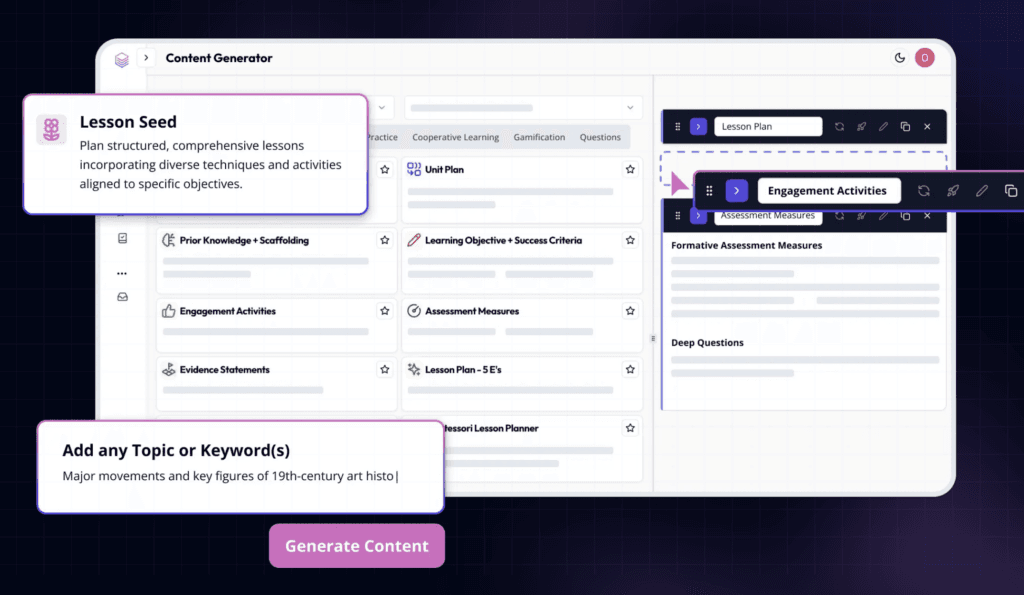
The workspace supports iteration without full regeneration. Generate a lesson seed, then use sidebar tools (Differentiate, Revise, Evaluate, Questions) to refine sections. The Questions dropdown produces multiple-choice, open-ended, discussion, essential, and exit ticket questions on demand from within your document.
Pricing: Free plan with approximately 15 generations per month. Pro plan at $5.99/month (~$50/year).
Pros
- Evidence-based pedagogical frameworks built directly into lesson outputs
- 110+ resource types including graphic organizers, games, CER activities, and BIP outlines
- One-click differentiation prompts from within the editing workspace
- Knowledge graph of educational research informs generated content
Cons
- AI edits appear in a side panel requiring manual acceptance, adding steps compared to inline editing
- Slides generator produces outlines only, not complete visual presentations
- No LMS integration or student-facing interaction features
Best for: Teachers who want research-backed, pedagogically defensible lesson structures, not just fast content generation.
5. NotebookLM
NotebookLM by Google solves a specific, persistent problem with AI in education: hallucination. Every general-purpose AI tool draws on broad training data and occasionally invents facts. NotebookLM only uses sources you upload. Every response it generates is grounded exclusively in those materials, citing exactly where in your documents each answer comes from.
For teacher prep, this is transformative. Upload your textbook chapters, research papers, curriculum guides, or class notes. Then ask NotebookLM to summarize a concept for your students, find supporting evidence for a claim, generate discussion questions from your own text, or create a podcast-style audio overview your class can listen to as a pre-lesson warm-up.
Students don’t log in to NotebookLM directly. It’s a teacher-side prep tool. But what you pull from it becomes the foundation for materials you then assign through other platforms.
Pricing: Free. No participant cap, no usage limits on core features.
Pros
- Zero hallucination: every output is grounded in your uploaded sources with citations
- Audio overviews turn your materials into podcast-style summaries students can listen to
- Completely free with no meaningful usage caps
- Your data stays private. Google doesn’t use your notebooks to train public models
Cons
- Teacher prep tool only, no student-facing features, assignment delivery, or tracking
- Requires uploading your own source material. It won’t generate from scratch on a topic
- No LMS integration or export to common teaching formats
Best for: Teachers who want to analyze and repurpose their own curriculum materials without risking inaccurate AI-generated information reaching students.
Grading & Assessment
6. Gradescope
The most painful part of grading isn’t reading student responses. It’s reading the same response fifty times. Teachers spend roughly 5 hours per week on grading and feedback, time that compounds fast across a full semester. Gradescope addresses this directly. Its AI groups similar answers together, so you write one piece of feedback and apply it to every student who gave a variation of that response.
This shifts grading from a linear, student-by-student process to a question-by-question one. For a class of 60 students, you might find that 80% gave variations of the same three answers. Grade those three answer patterns, and you’re done with the question.
It handles handwritten work (via AI handwriting recognition), typed responses, coding assignments, and multiple-choice tests. Rubric-based scoring ensures consistency across all submissions, and the final grade reports are clean enough to share directly with students.
Pricing: Free for individual instructors. School and district licenses available.
Pros
- Answer grouping is the core differentiator: grade similar responses in one pass instead of one by one
- AI handwriting recognition for scanning paper-based exams
- Works for written assignments, math, science, coding, and traditional exams
- Rubric-based scoring ensures consistent, defensible grades across all submissions
Cons
- Initial setup requires uploading and organizing exams, adding more overhead than simpler tools
- More commonly used in higher education; some K-12 teachers find the interface more complex than needed
- No content creation or student-facing learning tools
Best for: Teachers and professors grading large volumes of written work, exams, or coding assignments who need consistency and significant time savings at scale.
7. ClassPoint

ClassPoint turns PowerPoint into an interactive teaching platform. As a PowerPoint add-in, it embeds live polls, quizzes, drawing activities, word clouds, and gamification directly into your existing presentations, without requiring students to download a separate app.
What sets it apart is the range of student response types. Students can submit drawings, images, audio, or video recordings as answers, not just text or multiple choice. The AI quiz generator creates questions directly from your slide content at Bloom’s taxonomy levels you specify.
A gamification layer awards stars for correct answers, tracks points on a live leaderboard, and levels students up with badges throughout a lesson. Additional presenter tools (random name picker, on-slide whiteboard, timers, and annotation) make ClassPoint useful for running class, not just quizzing at the end.
Pricing: Free Basic plan with 20 AI quiz credits per month. Pro at $8/month (billed annually).
Pros
- Lives inside PowerPoint, zero workflow disruption for teachers already presenting in slides
- Accepts drawings, images, audio, and video as student responses, not just text
- Built-in gamification keeps participation high throughout a full lesson, not just at quiz time
- AI quiz generator builds questions from your existing slide content in seconds
Cons
- Requires PowerPoint, not useful if your school uses Google Slides primarily
- Designed for synchronous live sessions, no asynchronous or self-paced student access
- No content generation for lesson materials beyond quiz questions
Best for: Teachers who build and deliver lessons in PowerPoint and want live interactive elements (polls, quizzes, gamification) without ever leaving that environment.
Student Engagement & Tutoring
8. Curipod
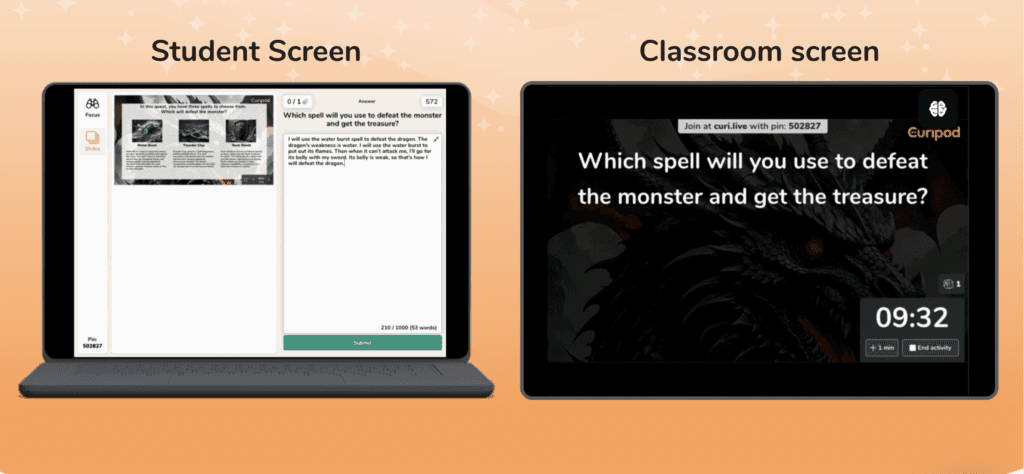
Curipod is built for live classroom engagement. You build a presentation (or upload an existing PowerPoint or PDF), embed interactive activities at key points, and run the session from your screen while students respond on their phones or laptops in real time.
The activity types go well beyond typical polling. Open-ended question slides show all student responses live on your screen, useful for immediate discussion. The AI Feedback feature reads student writing submissions and returns rubric-aligned feedback in real time, meaning students get written comments on their work while they’re still sitting in your classroom.
The “Curify My Slides” function automatically reads your uploaded presentation content and inserts interactive touchpoints. You don’t need to plan where activities go.
Pricing: Free plan includes unlimited students and unlimited session plays with limited AI generations per month. Premium is approximately $90/year.
Pros
- AI feedback on student writing happens during class, not hours later
- Drawing activities with AI grading on four distinct traits
- “Curify” automatically adds interactive touchpoints to your existing presentations
- Generous free tier: unlimited students, unlimited session plays
Cons
- Cannot export presentations back to Google Slides or PowerPoint
- No persistent student profiles or cross-session performance tracking
- Not designed for asynchronous homework-style activities
Best for: Teachers who want real-time student participation during class, especially those who want AI-generated writing feedback to happen in the moment, not the next day.
9. Khanmigo
Most AI tools will give students the answer. Khanmigo won’t. Built by Khan Academy, it uses a Socratic approach, asking guiding questions, offering hints, and prompting students to think through the next step rather than handing over the solution.
For teachers managing classrooms of different ability levels, this matters practically. A student stuck on a math problem at 10pm gets real help that builds understanding, not just an answer to copy. The teacher gets a report of what each student practiced and where they struggled.
Khanmigo integrates tightly with Khan Academy’s existing content library, making it most effective in classrooms already using Khan’s courses, exercises, or video assignments as part of the regular curriculum.
Pricing: Free for students through most US schools. Check the Khan Academy website for current access details in your region.
Pros
- Socratic approach builds genuine understanding rather than enabling answer-copying
- Writing coach helps students plan, draft, and revise essays step by step
- Teacher visibility into student conversations and practice session data
- Grounded in Khan Academy’s trusted curriculum content, not general AI knowledge
Cons
- Most effective when students are already using Khan Academy; it doesn’t work well standalone
- Content coverage focused on K-12 math, science, and ELA, with limited coverage for other subjects
- Slower, more guided pace can frustrate students who want quick answers
Best for: Teachers using Khan Academy who want a student-facing AI tutor that builds understanding through guided dialogue rather than direct answers.
Differentiation
10. Diffit
Differentiating reading materials is one of the most time-consuming parts of teaching. Diffit automates the hardest part. Paste any text, URL, or topic. Set a reading level. Diffit rewrites the content at that level while preserving the core meaning.
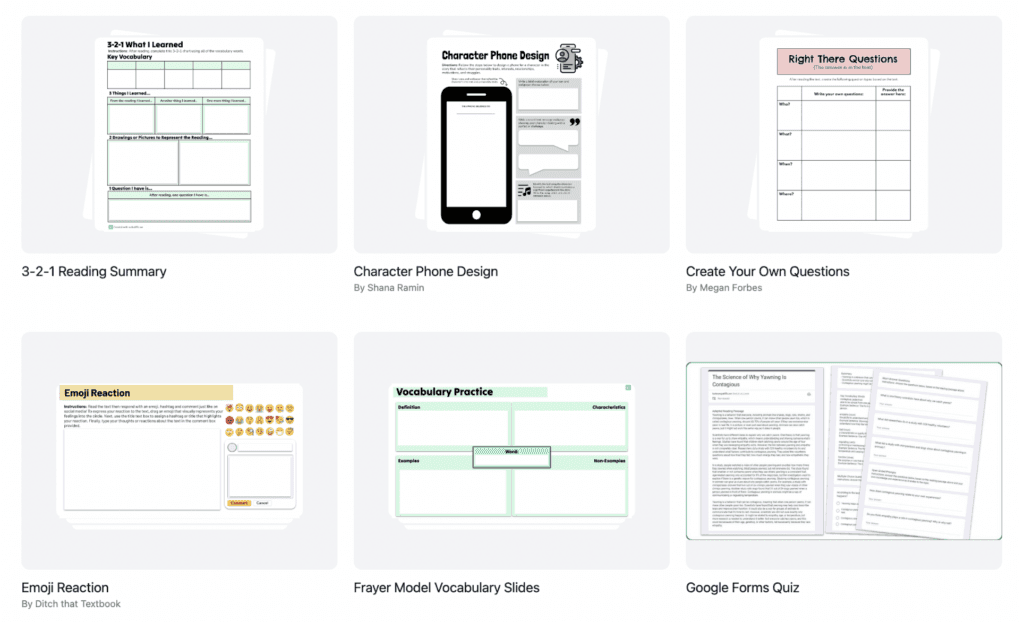
The output isn’t just a rewritten passage. Each version includes key vocabulary, a summary, multiple-choice comprehension questions, open-ended discussion prompts, and a critical thinking extension, all at the level you specified. Generate the same content at three different Lexile levels and you have differentiated materials for your whole class in under two minutes.
Pricing: Completely free for individual teachers. School-wide premium license requires a custom quote.
Pros
- Generates multiple reading levels of the same content simultaneously
- Each version includes vocabulary, summary, comprehension questions, and extension prompts
- Works from any text, URL, or topic, no special formatting required
- Completely free for individual teachers with no usage limits
Cons
- Focused solely on reading differentiation, no broader lesson planning or assessment tools
- No student-facing features, assignment delivery, or performance tracking
- School-wide features require a paid license at custom pricing
Best for: Teachers who regularly differentiate reading materials for diverse learners and want to stop spending hours manually rewriting the same texts at different levels.
A Few More Worth Knowing
These didn’t make the main list but come up regularly in teacher workflows:
- ChatGPT: Useful as a general-purpose drafting tool for one-off tasks: writing parent emails, brainstorming activity ideas, generating rubric language. It doesn’t replace any of the tools above for classroom-specific workflows. Our Edcafe AI vs ChatGPT comparison breaks down exactly where ChatGPT falls short for teachers, but it’s fast for ad hoc requests.
- Canva for Education: Free for K-12 teachers and students. Best for posters, newsletters, certificates, and presentation templates. Strong design resource for project-based student work.
- Quill.org: Free nonprofit writing practice with real-time grammar and sentence-level feedback. Students complete short writing activities; teachers see reports without manually grading anything. Useful for ELA teachers who want low-prep writing practice.
- Twee: ESL/EFL-focused tool for generating dialogue exercises, conversation starters, and reading comprehension activities. Particularly useful for English language teachers.
How to Pick the Right AI Teaching Tool
With this many options, the hardest part isn’t finding tools. It’s knowing which problem you’re actually trying to solve. Here are four questions that cut through the noise:
- Where does your time go? Track one teaching week and identify where you lose the most hours. Lesson prep → creation tools. Grading → feedback tools. Student disengagement → interaction tools. Differentiation → adaptation tools.
- Do students need to interact with it, or just you? Most tools generate teacher-side content. Far fewer put materials directly in students’ hands and return data on what they did with them. If student interaction and tracking matter to you, your options narrow significantly.
- What’s your current tech stack? A Chrome-only extension won’t work on Safari. A PowerPoint add-in won’t help if your school uses Google Slides. Match tools to what you already use before evaluating features.
- Can you actually test it before paying? Every tool on this list has a free tier or trial. If a tool asks for a credit card before you can see anything, skip it.
One honest recommendation: Start with one tool: the one that solves your biggest pain point this week. Use it for a month. Evaluate it. Then add another only if you still need to.
FAQs
What are the best AI teaching tools for classroom use in 2026?
The best AI teaching tools for 2026 include Edcafe AI for full-cycle classroom management (create, assign, grade, track), MagicSchool AI for admin and planning, Brisk Teaching for Chrome-based workflows, ClassPoint for interactive PowerPoint lessons, Curipod for live student engagement, and Diffit for reading differentiation. The right choice depends on where your time is going: lesson prep, grading, student engagement, or differentiation.
Are AI tools for teachers free to use?
Most AI teaching tools offer genuinely usable free plans. Edcafe AI, MagicSchool AI, Curipod, Diffit, NotebookLM, Brisk Teaching, and Gradescope all have free tiers that work for classroom use without a credit card. Paid plans typically unlock higher usage limits, advanced features, or school-wide sharing options.
Can AI tools replace lesson planning entirely?
AI tools can generate strong first drafts of lesson plans, suggest activities, and align content to standards in seconds. But a teacher’s judgment about what students need, what worked last week, and what the classroom dynamic requires can’t be automated. AI is most valuable as a starting point and time-saver, not a replacement for pedagogical thinking.
What AI tool is best for grading essays and open-ended assignments?
Gradescope is the most widely used tool for grading written work and exams at scale. Its answer-grouping feature lets teachers grade similar responses in one pass rather than one by one. For K-12 open-ended assignments, Edcafe AI’s assignment grader aligns student submissions to your rubric and drafts personalized written feedback per criterion. Both have free plans.
How do AI teaching tools protect student data?
Data privacy varies by tool. Edcafe AI holds SOC 2, GDPR, FERPA, and COPPA compliance certifications, and does not use teacher or student data to train its AI models. NotebookLM does not use uploaded content to train Google’s public models. MagicSchool AI and Brisk Teaching have school data protection agreements available upon request. Always review a tool’s privacy policy before having students use it, particularly with minors.
What is the difference between AI tools for teachers and AI tools for students?
Most AI teaching tools are teacher-facing: they help with planning, grading, and content creation, but students never log in. A smaller number of tools, including Edcafe AI, Khanmigo, and Curipod, are designed for direct student interaction, where students engage with AI-generated materials and teachers see the results in a dashboard. If tracking student learning and engagement matters to you, choose tools from this second category.